The best keyboards for work depend on how you type, how much desk space you have, and whether you switch between devices. These picks range from quiet, office-focused wireless models to compact mechanical keyboards with work-friendly controls and connectivity.
Quick Top Products
JLab JBuds Wireless Keyboard

- 95 soft-touch keys and a media knob support quieter typing and quick playback controls.
- Bluetooth or USB dongle connectivity can switch among up to three devices.
- Rechargeable battery is rated for up to 30 days of wireless use.
Best For: People who want a quiet full-number-pad layout and wireless switching between work devices.

JLab Epic Wireless Keyboard

- All 108 full-size keys are backlit.
- Bluetooth 5.2 supports pairing with up to three devices, with a dongle option.
- A built-in smart media knob provides hands-on audio volume control.
Best For: Workers who want a full-size wireless keyboard with backlighting and dedicated media control.
JLab Go Wireless Keyboard
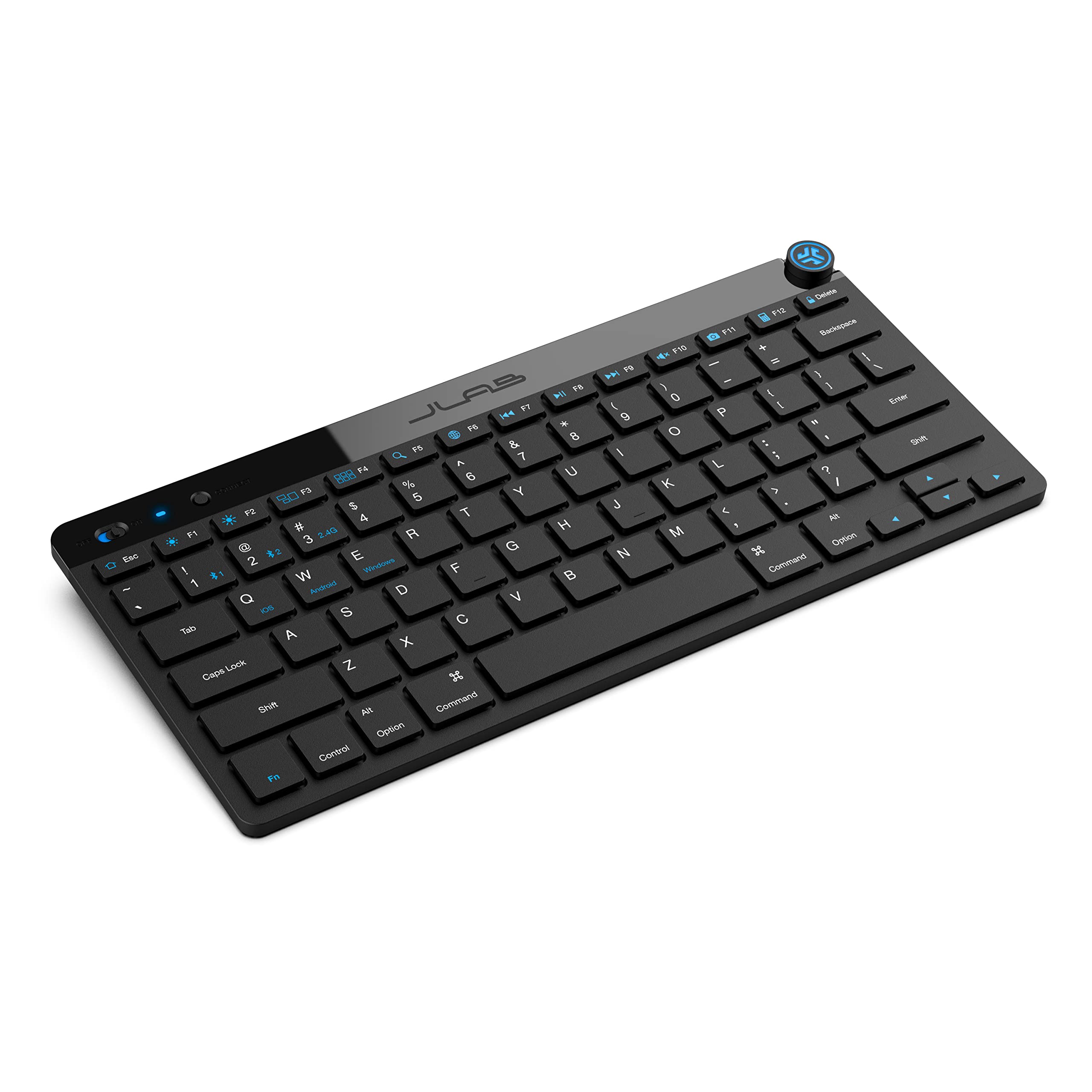
- Compact low-profile keys are designed for quiet, comfortable typing.
- Bluetooth 5.0 and USB dongle connectivity support up to three saved devices.
- The offer contains four keyboards.
Best For: People who need a light, compact keyboard for travel, a shared workspace, or a group of users.
SteelSeries Apex 3

- Whisper-quiet switches are specified for up to 20 million low-friction keypresses.
- IP32 water resistance is designed to help prevent accidental liquid damage.
- A magnetic wrist rest provides palm support.
Best For: Workers who prefer quiet wired typing, a wrist rest, and dedicated multimedia controls.
SOLAKAKA KI99 Pro Silent

- Silent switches and five noise-reducing layers target quieter typing.
- The 96% layout saves desk space and includes a control knob.
- Tri-mode connectivity includes Bluetooth, 2.4 GHz, and Type-C.
Best For: Mechanical-keyboard users who want a compact number-pad layout and quieter switches for work.
SOLAKAKA KI99 Pro 96%
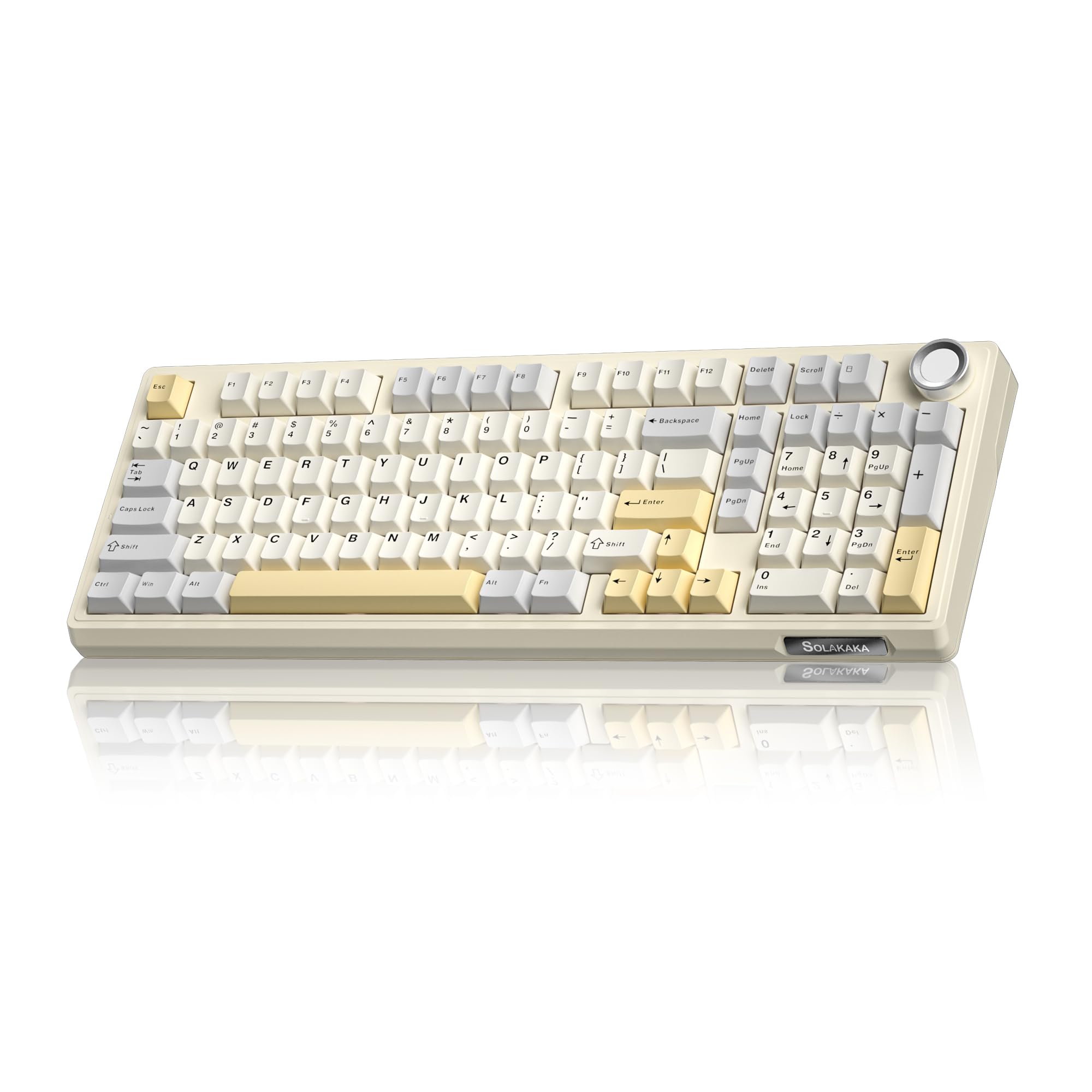
- A 96% layout keeps most full-size functions in a compact arrangement.
- The knob adjusts volume, media playback, and lighting brightness.
- Three connection modes and a 10,000 mAh battery support wireless or wired use.
Best For: Workers who want a mechanical keyboard with a number pad, multi-device wireless, and customizable controls.
SOLAKAKA A99 Pro
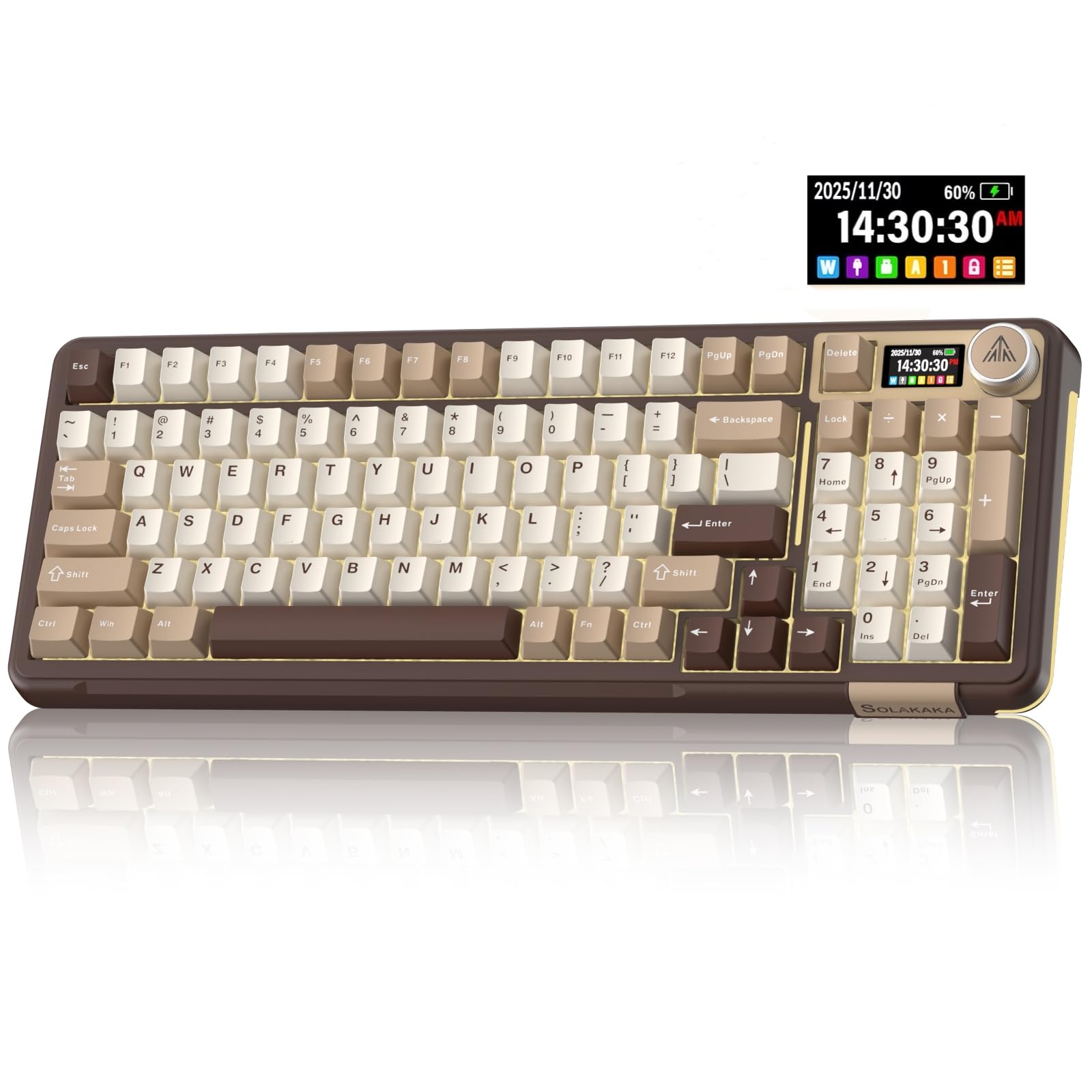
- The LCD can show time, battery level, connected system, and connection mode.
- Tri-mode connections support Bluetooth, 2.4 GHz wireless, and USB-C.
- The keyboard can save up to five devices.
Best For: People who want a compact mechanical keyboard with an information screen and frequent device switching.
SOLAKAKA A99 Pro Wireless
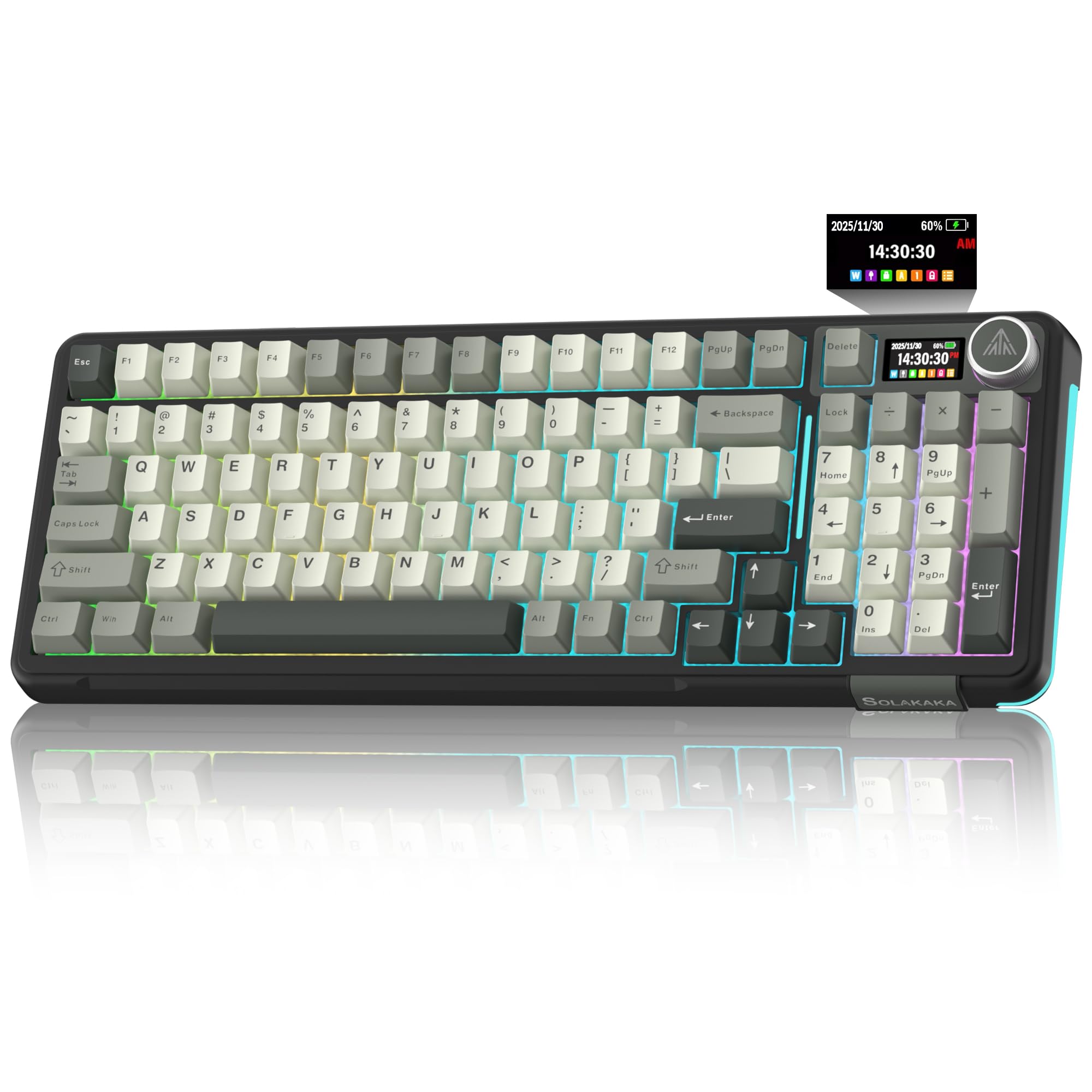
- The LCD screen displays information including the date, time, battery level, connected system, connection mode, and GIF image.
- The LCD shows battery, connection, and system information.
- Bluetooth, 2.4 GHz, and USB-C connections support multiple devices.
Best For: Workers who want a space-saving number-pad layout, device status screen, and hot-swappable switches.
SOLAKAKA A99 Pro 96%
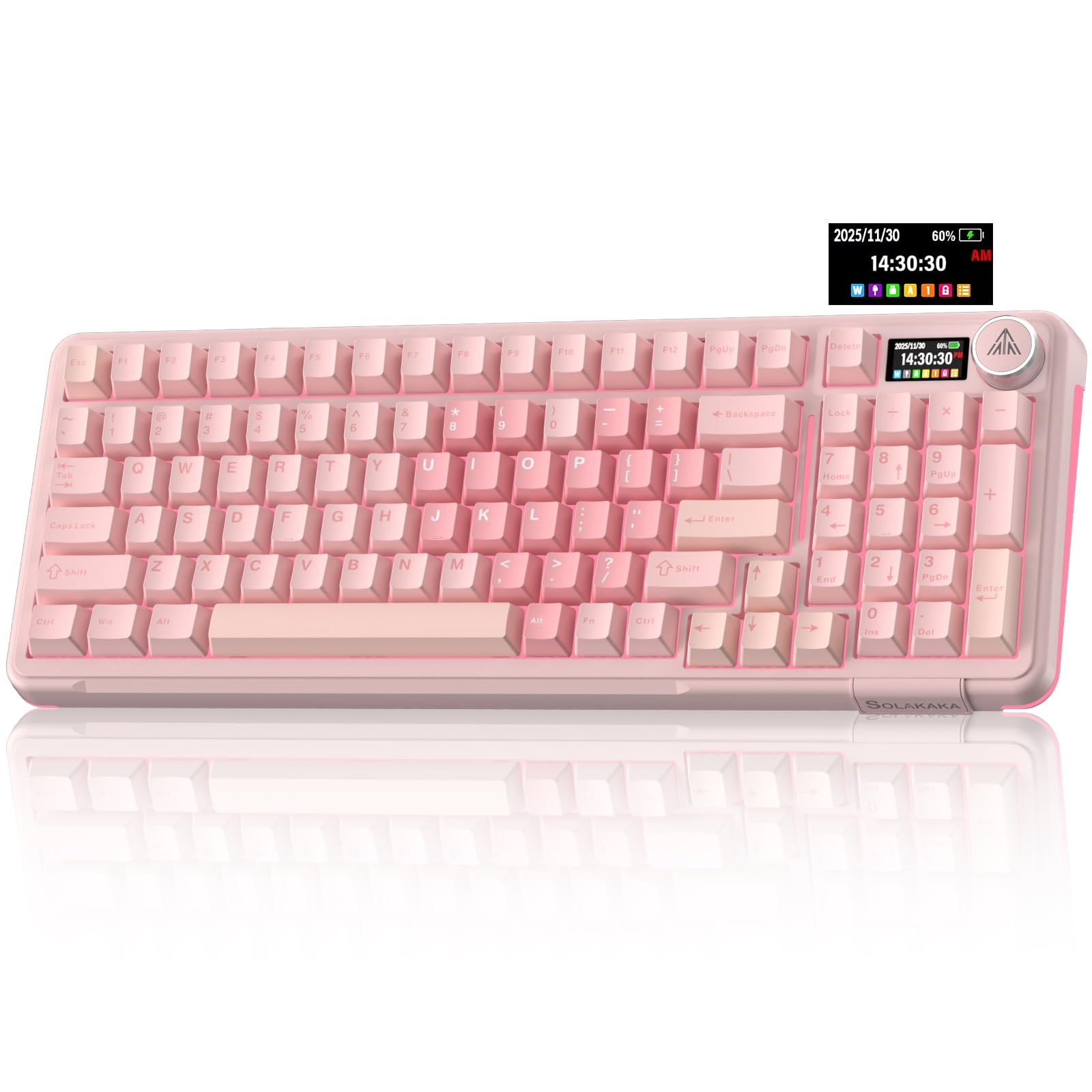
- The LCD screen displays information including the date, time, battery level, connected system, connection mode, and GIF image.
- The LCD screen and metal knob provide status and control functions.
- It connects over Bluetooth, 2.4 GHz wireless, or USB-C.
Best For: People who want a 96% mechanical layout with a screen, knob, and several connection choices.
Quiet Wireless Typing
JLab JBuds Wireless Keyboard, 95 Key, Multi-Device Bluetooth and USB dongle, Soft Touch Keys, Media knob, Custom Profiles, Black
The JLab JBuds pairs soft-touch keys with a dedicated media knob for volume and playback control during a workday. Its 95-key layout keeps a full numerical pad while taking a slimmer approach than a standard full-size keyboard.
It connects by Bluetooth 5.2 or USB wireless dongle and can toggle among up to three connections, which suits a desk shared between a computer and mobile devices. The rechargeable battery is rated for up to 30 days of wireless use.
Its quiet feel and straightforward controls make it a practical office pick; check that its compact layout has the keys you rely on.
Best For: People who want a quiet full-number-pad layout and wireless switching between work devices.
| Pros | Cons |
|---|---|
|
|
Choose this for a work desk where quiet keys, a number pad, and quick switching matter more than a conventional full-size layout. Bluetooth and the dongle offer two connection approaches, while app profiles allow shortcut customization.
Before buying, check that the 95-key arrangement includes the navigation and function keys you use most; the supplied details do not give a complete key map or dimensions.
Backlit Full-Size Workstation
JLab, Epic, Wireless Keyboard, Bluetooth 5.2, USB Dongle, Multi-Device, Backlit, 108 Keys, Black
The JLab Epic provides a full-size 108-key layout with backlighting across every key, useful for typing in a dim workspace. Soft-touch keys aim for a comfortable, quiet feel through long sessions, while the built-in media knob gives direct volume control.
It pairs with up to three devices over Bluetooth 5.2 and also offers a USB wireless dongle. A 2000 mAh rechargeable battery powers the keyboard, and JLab Work App profiles can adapt shortcuts to different workflows.
This is a more conventional desk layout than compact multi-device options; confirm that the full-size footprint suits your desk.
Best For: Workers who want a full-size wireless keyboard with backlighting and dedicated media control.
| Pros | Cons |
|---|---|
|
|
Pick the Epic if you want a full-size arrangement and see value in backlighting, device switching, and a physical volume knob. The 2000 mAh capacity is provided, but runtime is not, so charging frequency cannot be compared with keyboards that state an estimated duration.
Check desk clearance for the full-size frame and whether the JLab Work App fits your computer setup before relying on its custom profiles.
Travel and Shared-Desk Compact
JLab Go Wireless Keyboard, Bluetooth and USB dongle, Multi-Device, Compact, Black (4 Pack)
The JLab Go uses a compact, low-profile design with quiet typing and wireless connections over Bluetooth 5.0 or a USB dongle. It can save up to three device connections and works across Windows, macOS, iOS, Android, and Chrome OS, making it a flexible option for people who move between laptops, tablets, and phones.
The offer is a four-pack, which may suit a team, classroom, or household furnishing several workstations. That bundle is less convenient if you need only one keyboard.
The supplied information gives a 78-key count; check whether the compact arrangement preserves the keys you need for daily work.
Best For: People who need a light, compact keyboard for travel, a shared workspace, or a group of users.
| Pros | Cons |
|---|---|
|
|
Consider the Go when portability and outfitting multiple workstations are priorities. Its 78-key compact layout and low-profile design reduce bulk, while Bluetooth and a dongle cover common wireless setups.
The four-pack is the main practical tradeoff for a solo buyer. Before choosing it for daily desk work, confirm that its compact key arrangement has the navigation and number keys you need, and check the battery requirements because runtime details are not provided.
Quiet Spill-Conscious Wired Setup
SteelSeries Apex 3 RGB Gaming Keyboard – 10-Zone RGB Illumination – IP32 Water Resistant – Premium Magnetic Wrist Rest (Whisper Quiet Gaming Switch)
The SteelSeries Apex 3 offers whisper-quiet switches, dedicated multimedia controls, and a magnetic wrist rest with full palm support. Its 10-zone RGB illumination is adjustable, and the keyboard has an IP32 water-resistance rating intended to help prevent accidental spill damage.
These features make it a plausible shared desk or home-office choice when quiet operation and easy volume access matter. It is a gaming-oriented keyboard, so check that its key layout and software features match ordinary work tasks.
The supplied details do not specify wireless connectivity, so plan for a wired desktop setup unless the exact connection is confirmed.
Best For: Workers who prefer quiet wired typing, a wrist rest, and dedicated multimedia controls.
| Pros | Cons |
|---|---|
|
|
Choose the Apex 3 if quieter typing, a wrist rest, and dedicated media controls are more important than wireless convenience. IP32 water resistance provides a useful spill-related feature, but it should not be treated as waterproofing.
Check the exact connection method and whether the full layout fits your desk and work habits; those details are not fully described here. Its gaming focus may also mean RGB features are more prominent than office customization.
Quiet Mechanical Typing with Number Pad
SOLAKAKA KI99 Pro Wireless Mechanical Keyboard with Quiet Switch, Hot Swappable Pre-Lubed Switches with RGB Backlit, Gasket Structure Computer Gaming Keyboard (BlackBlue, Silent Switch)
The KI99 Pro Silent combines a 96% layout with a knob for volume, media, and lighting controls. Its silent switches and five noise-reducing layers target lower typing noise, while the gasket structure shapes the feel.
The keyboard supports Bluetooth 5.0, 2.4 GHz wireless, and Type-C wired connections, with a 10,000 mAh battery and Windows and macOS compatibility. Hot-swappable keys allow 3-pin or 5-pin switch replacement.
It keeps a numeric keypad while saving desk space relative to a full-size arrangement. Check the exact key arrangement and whether its mechanical feel fits your office environment.
Best For: Mechanical-keyboard users who want a compact number-pad layout and quieter switches for work.
| Pros | Cons |
|---|---|
|
|
This KI99 Pro version is the better fit among mechanical options for someone who wants quieter switches and a number pad without a full-size footprint. The triple connection modes and switch replacement flexibility add adaptability, though battery capacity alone does not establish runtime.
Confirm the key map and physical dimensions before ordering, especially if you depend on dedicated navigation keys. Its gaming branding and RGB lighting may be unnecessary if you want a plain office keyboard.
Customizable 96% Mechanical Layout
SOLAKAKA KI99 Pro 96% Wireless Gaming Keyboard, RGB Creamy Keyboardw with Knob, Hot-Swappable Pre-Lubed Switches, Gasket Structure Mechanical Keyboards (Beige-White, Non-Silent Version)
The KI99 Pro offers a 96% layout that retains most full-size functions while saving desk space. Its knob adjusts volume, media playback, and lighting brightness, and the keyboard connects through Bluetooth 5.0, 2.4 GHz wireless, or Type-C.
A 10,000 mAh battery, hot-swappable 3-pin or 5-pin switches, and programmable keys give it a customizable profile for mixed office and personal use. Five noise-reducing layers and a gasket structure shape the typing feel, but this beige-white, non-silent version is not the quiet-switch variant.
Consider the neighboring silent option if reduced typing sound matters in a shared room.
Best For: Workers who want a mechanical keyboard with a number pad, multi-device wireless, and customizable controls.
| Pros | Cons |
|---|---|
|
|
Pick this version when you want a compact mechanical layout with a numeric keypad and value multi-device connectivity and switch customization. Its 96% arrangement, media knob, and programmable functions support varied desk tasks.
The title identifies it as non-silent, so typing sound is a real consideration in close quarters. Compare its beige-white styling and switch feel with the separately offered silent KI99 variant, and confirm that the shorter layout retains your preferred dedicated keys.
Screen and Knob for Device Switching
SOLAKAKA A99 Pro Mechanical Keyboard with LCD Screen & Metal Knob, Wireless Gaming Keyboard with BT5.0/2.4GHz/USB-C, Hot Swappable Creamy Keyboard, Gasket Structure, RGB Backlit, for Win/Mac
The SOLAKAKA A99 Pro adds an LCD screen showing information such as time, battery level, connected system, and connection mode. A metal knob controls functions including volume, lighting, and system switching.
It supports Bluetooth 5.0, 2.4 GHz wireless, and USB-C wired connections, and can save up to five devices. Hot-swappable switches, a gasket structure, and five cushioning layers make it a customizable mechanical option for work and gaming.
The screen and lighting give it a more feature-rich desk presence than a plain office keyboard. Check the layout and software compatibility for your operating system before relying on customization.
Best For: People who want a compact mechanical keyboard with an information screen and frequent device switching.
| Pros | Cons |
|---|---|
|
|
Choose the A99 Pro if an on-keyboard status display and switching among several devices are useful in your setup. The three connection modes and hot-swappable switches support flexibility, while the gasket structure and layered cushioning emphasize a particular mechanical feel.
The supplied details do not identify the layout or battery runtime, so check both before purchase, especially if you rely on a dedicated number pad or need predictable charging intervals.
96% Layout with LCD Status Screen
SOLAKAKA A99 Pro Wireless Mechanical Keyboard with LCD Screen & Metal Knob, 2.4GHz/BT5.0/USB-C, RGB Backlit Gaming Keyboard, Hot Swappable, Creamy Keyboard with Gasket Structure, for Win/Mac
This A99 Pro version has a 96% layout with 97 keys, retaining a numeric keypad, arrow keys, and essential function keys in a space-saving format. Its LCD displays details such as battery level, connection mode, and the connected system, while the knob handles volume, lighting, and system controls.
Bluetooth 5.0, 2.4 GHz wireless, and USB-C wired connections can serve up to five devices. Hot-swappable switches and programmable settings add room to tailor the keyboard to work habits.
It is a mechanical gaming keyboard with RGB lighting; check the layout details and software support for your operating system before depending on custom profiles.
Best For: Workers who want a space-saving number-pad layout, device status screen, and hot-swappable switches.
| Pros | Cons |
|---|---|
|
|
This version is a strong fit if you want the number pad and arrow keys in a smaller footprint, plus an LCD that reports connection and battery status. Its screen, knob, wireless modes, and programmable features make it more involved than a basic work keyboard.
Check how the software works on your operating system and whether the mechanical switch feel suits your workspace. Battery capacity and runtime are not provided in these details, so charging expectations remain uncertain.
96% Screen Keyboard for Work and Play
SOLAKAKA A99 Pro Wireless Gaming Keyboard with LCD Screen & Metal Knob, 96% Layout Mechanical Keyboard, 2.4GHz/BT5.0/USB-C, Hot Swappable, Creamy Keyboard with Gasket Structure, RGB, for Win/Mac
The A99 Pro 96% combines a 97-key compact layout with a numeric keypad, arrow keys, and essential function keys. Its screen reports status such as battery level and connection mode, and the knob adjusts volume or lighting and switches functions.
It offers Bluetooth 5.0, 2.4 GHz wireless, and USB-C wired connections, with support for up to five devices. Hot-swappable switches and a gasket structure let users tailor the typing setup.
It is a feature-heavy mechanical keyboard that can serve mixed work and gaming desks. Check the computer layout and operating-system support before relying on custom software or macros.
Best For: People who want a 96% mechanical layout with a screen, knob, and several connection choices.
| Pros | Cons |
|---|---|
|
|
Consider this option if a compact number-pad layout, display, and knob fit your daily routine. Its three connection modes and device support offer flexibility, while switch replacement permits later customization.
The supplied features overlap substantially with another A99 Pro 96% offer, so focus on the exact package and layout details before choosing between them. Check the key map, software compatibility, and battery runtime expectations; the latter is not specified.
How to Choose Keyboards For Work
How We Picked Best Keyboards for Work
The candidates include wireless office keyboards, quiet typing options, compact designs, and mechanical models with customizable switches. We prioritized features that affect real desk use: key count and layout, noise-focused design, media controls, device switching, connection methods, and clearly described ergonomic or spill-related features.
Several supplied keyboards are gaming models, so their work value depends on practical features such as a retained number pad, multi-device support, quieter switches, or a wrist rest. We excluded near-duplicate offers and configurations with conflicting model details.
A gaming label alone does not make a keyboard unsuitable for work, but gaming-specific controls do not substitute for a useful layout.
Comparing Keyboards for Work
The JLab JBuds models emphasize quiet, soft-touch typing, wireless device switching, and media knobs. The Epic adds a full-size 108-key layout and backlighting, while the Go is a compact four-pack suited to multiple workstations.
The SteelSeries Apex 3 adds whisper-quiet switches, a magnetic wrist rest, and IP32 water resistance, but its supplied features do not spell out connection details.
The SOLAKAKA models cater to mechanical-keyboard users. The KI99 Pro Silent combines a compact number-pad layout with silent switches, while its non-silent counterpart emphasizes customization and a layered typing feel.
The A99 Pro options add a status screen and knob; the version with explicit 97-key details retains a number pad and arrows. Compare the exact offer and layout because several names refer to closely related models.
| Product | Standout features | Best for |
|---|---|---|
| JLab JBuds Wireless KeyboardCheck Price |
| People who want a quiet full-number-pad layout and wireless switching between work devices. |
| JLab Epic Wireless KeyboardCheck Price |
| Workers who want a full-size wireless keyboard with backlighting and dedicated media control. |
| JLab Go Wireless KeyboardCheck Price |
| People who need a light, compact keyboard for travel, a shared workspace, or a group of users. |
| SteelSeries Apex 3Check Price |
| Workers who prefer quiet wired typing, a wrist rest, and dedicated multimedia controls. |
| SOLAKAKA KI99 Pro SilentCheck Price |
| Mechanical-keyboard users who want a compact number-pad layout and quieter switches for work. |
| SOLAKAKA KI99 Pro 96%Check Price |
| Workers who want a mechanical keyboard with a number pad, multi-device wireless, and customizable controls. |
| SOLAKAKA A99 ProCheck Price |
| People who want a compact mechanical keyboard with an information screen and frequent device switching. |
| SOLAKAKA A99 Pro WirelessCheck Price |
| Workers who want a space-saving number-pad layout, device status screen, and hot-swappable switches. |
| SOLAKAKA A99 Pro 96%Check Price |
| People who want a 96% mechanical layout with a screen, knob, and several connection choices. |
Choosing a Quiet Office Keyboard
Noise matters in shared offices, calls, and quiet home workspaces. The JBuds soft-touch keys are described as quiet, and the SteelSeries Apex 3 uses whisper-quiet switches.
The SOLAKAKA KI99 Pro Silent is the mechanical option with silent switches and noise-reducing layers. Other mechanical models are described as creamy or gasket-mounted, but those terms do not establish that keystrokes will be quiet enough for coworkers.
A wrist rest can also affect desk comfort. The Apex 3 includes a magnetic rest, while the JLab keyboards here emphasize slimness, low profile, or soft-touch keys.
None of these features alone determines fit, so consider your typing posture and whether the keyboard's overall height suits your desk.
Layouts, Number Pads, and Desk Space
A full number pad can speed spreadsheet work and numeric entry, but a full-size keyboard takes more desk space. The JLab Epic explicitly has 108 keys; JBuds offers 95 keys with a full numerical pad.
The SOLAKAKA A99 Pro version with 97 keys retains a number pad, arrows, and essential function keys in a 96% layout. The KI99 Pro also uses a 96% layout with a number pad.
Compact keyboards can leave more room for a mouse or notebook, but key omissions may slow familiar workflows. The JLab Go has 78 keys, so check its exact layout before relying on it as your only desk keyboard.
Bundles also change the buying decision: the Go is offered as a four-pack, and one JBuds offer is a 16-pack, which suit group setups better than a single home office.
Wireless Connections and Customization
For switching among a computer, tablet, and phone, look for explicit device limits and supported operating systems. JLab JBuds connects through Bluetooth 5.2 or a USB dongle and supports up to three connections.
The Go uses Bluetooth 5.0 or a dongle and saves up to three devices. The SOLAKAKA A99 Pro supports Bluetooth 5.0, 2.4 GHz wireless, and USB-C wired modes, with up to five devices; the KI99 Pro offers similar connection types.
Customization varies from shortcut profiles in the JLab Work App to hot-swappable switches and programmable controls on SOLAKAKA models. If your work depends on remapping keys or macros, check that the software supports your operating system.
Connection flexibility is useful only when your everyday devices pair reliably with the particular keyboard mode you plan to use.
Who Should Buy Which Work Keyboard?
Choose the JLab JBuds for soft-touch typing, a full number pad, and switching between a few work devices. Choose the JLab Epic if you want a full-size backlit keyboard, or the Apex 3 if whisper-quiet switches and a magnetic wrist rest matter more.
The compact JLab Go bundle fits teams or households needing several lightweight keyboards.
For mechanical typing, the KI99 Pro Silent is the clearest choice for a quieter compact layout with a number pad. Choose an A99 Pro if a screen, knob, and multi-device connections appeal, and verify the precise layout and software support for your setup.
Check bundle quantity, key arrangement, connection method, and typing sound before selecting a model for a shared office.